SideMonitor
로컬 AI·서비스 포트·시스템 모니터 · AI & Port Monitor
한국어
지원
SideMonitor 는 서비스 포트와 로컬 AI(Ollama·LM Studio) 상태, CPU·GPU·메모리·네트워크·디스크 사용량과 디스크 용량, 메모리 압력, 상위 프로세스, 열 상태, 배터리를 화면 왼쪽이나 오른쪽 가장자리에 실시간 그래프로 보여주는 macOS 메뉴바 앱입니다.
문의
버그 신고, 기능 제안, 그 밖의 문의는 이메일로 보내 주세요. 보통 2~3일 안에 답변드립니다.
자주 묻는 질문
패널이 보이지 않아요.
메뉴바의 그래프 아이콘 → 패널 다시 표시를 누르세요. 디스플레이가 여러 개라면 디스플레이 메뉴에서 표시할 화면을 고를 수 있습니다.
패널을 클릭할 수 없어요.
기본적으로 클릭 통과가 켜져 있어 패널 뒤의 창을 그대로 쓸 수 있습니다. 끄려면 메뉴에서 클릭 통과를 해제하세요.
최대화한 창이 패널 밑으로 들어가요.
macOS 는 화면 일부를 따로 비워 두는 기능을 제공하지 않습니다. 항상 위에 표시를 끄면 패널이 창 뒤로, 바탕화면 위젯처럼 놓입니다.
"AI 코딩 도구" 숫자가 계정 사용량과 달라요.
이 카드는 구독 한도(남은 사용량)가 아니라, 이 맥에 남은 AI 코딩 도구(Claude Code · Codex CLI · Gemini CLI · OpenCode · Cline 등) 기록을 합산한 값입니다. 다른 기기·휴대폰·웹, Claude 데스크톱 앱 채팅, 클라우드 세션은 포함되지 않고, 캐시에서 다시 읽은 토큰은 포함되어 계정 화면과 숫자가 다를 수 있어요. 이 맥에서 AI 가 얼마나 일하고 있는지 보는 용도이며, 정확한 한도는 각 서비스의 사용량 화면에서 확인하세요. 대화 내용은 읽어서 저장하거나 보내지 않습니다.
"AI 코딩 도구" 카드가 "–" 로 나와요.
최근 7일 동안 이 맥에서 쓴 기록이 없다는 뜻입니다. App Store 판은 메뉴 AI 코딩 도구 기록 폴더 선택… 에서 홈 폴더를 한 번 허용해야 기록을 읽을 수 있어요.
"이벤트 기록"은 무엇인가요? (1.3)
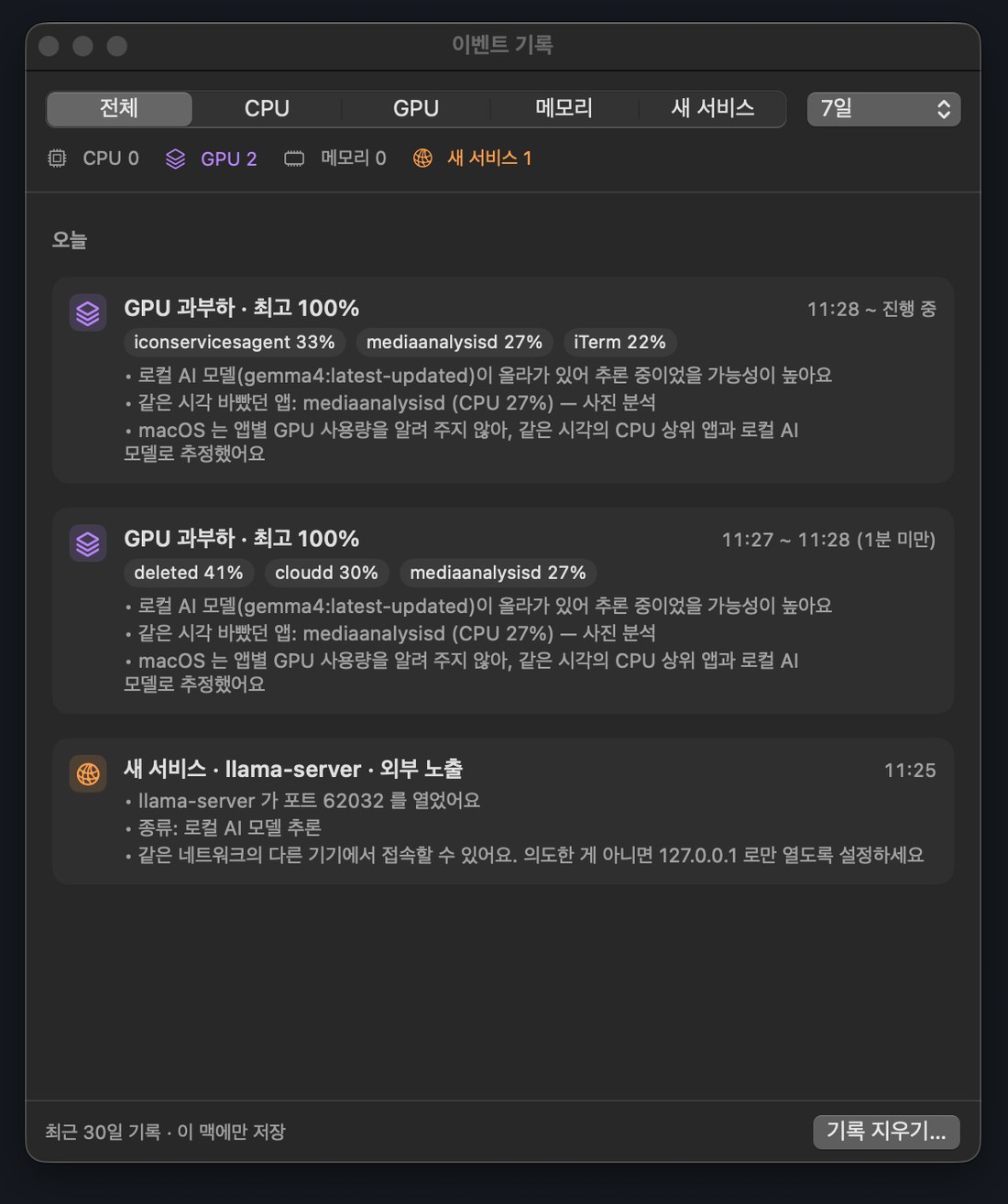
CPU·GPU 과부하, 메모리 부족, 새 서비스 포트가 생긴 시각과 그때 자원을 많이 쓴 앱·로컬 AI 모델을 최근 30일 동안 이 맥에만 남기고, 원인을 추정해 보여 줍니다. 메뉴 › 이벤트 기록… 에서 볼 수 있고, 창 아래 기록 지우기로 모두 지울 수 있어요.
로그인할 때 자동으로 실행하고 싶어요.
메뉴에서 로그인 시 자동 실행을 켜세요.
앱을 종료하려면?
메뉴 맨 아래 SideMonitor 종료를 누르세요.
English
Support
SideMonitor is a macOS menu bar app that shows service ports, local AI (Ollama · LM Studio) status, and live CPU, GPU, memory, network and disk graphs, plus disk space, memory pressure, top processes, thermal state and battery, on the left or right edge of your screen.
Contact
For bug reports, feature requests or any other questions, email us. We usually reply within 2–3 days.
FAQ
I can't see the panel.
Click the chart icon in the menu bar and choose Bring Panel to Front. With multiple displays, pick one from Display. The app shows English menus on non-Korean Macs; you can switch under 언어 / Language.
I can't click the panel.
Click-through is on by default so you can use the windows behind it. Turn it off in the menu.
Maximized windows go under the panel.
macOS doesn't let apps reserve part of the screen. Turn off Always on Top to keep the panel behind your windows like a desktop widget.
The "AI Coding Tools" numbers don't match my account usage.
That card is not your subscription limit. It adds up the local logs that AI coding tools (Claude Code, Codex CLI, Gemini CLI, OpenCode, Cline and others) leave on this Mac. Usage on other devices, phones, the web, Claude desktop-app chats and cloud sessions is not included, and cache-read tokens are counted, so the numbers can differ from your account page. Use it to see how much AI work runs on this Mac; check each service's usage page for your actual limits. Conversation contents are never stored or sent.
The "AI Coding Tools" card shows "–".
There's no usage on this Mac in the last 7 days. In the App Store version, allow your home folder once via Choose AI Coding Tool Log Folder… in the menu.
What is "Event History"? (1.3)
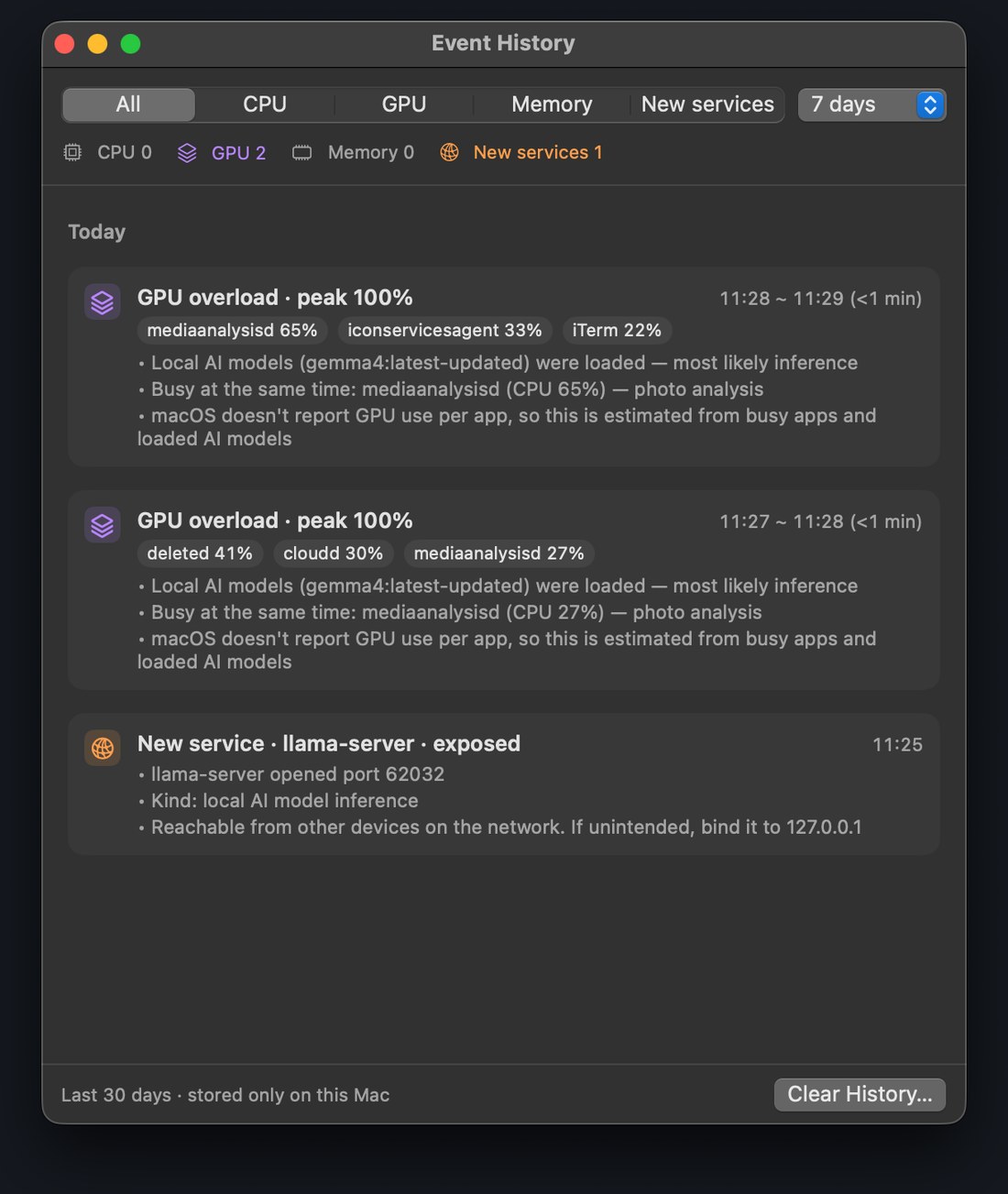
For the last 30 days, it keeps on this Mac only when CPU/GPU overload, memory exhaustion or a new service port occurred, with the busiest apps and loaded local AI models at that time, and suggests a likely cause. Open it from the menu › Event History…; Clear History… deletes everything.
How do I quit?
Choose Quit SideMonitor at the bottom of the menu.